Transforming stressful, last-minute school culture poster assignments into an autonomous, kid-driven learning adventure using precision print calibration, active discovery quizzes, and speech synthesis.
🔍 The Problem Space
Context
Every autumn, hundreds of thousands of elementary school students (kindergarten through early elementary) and their families receive assignment sheets for Hispanic Heritage Month and international culture days. The school rubric typically demands:
- A standard flat 22″ × 28″ poster board (oriented landscape: 28″ wide × 22″ tall).
- Up to 9 distinct informational categories: geography, capital city, traditional cuisine, music & dance, national clothing, cultural crafts/traditions, landmarks, famous historical or cultural heroes, and fun trivia.
- Mandatory visual presentation criteria: clear section labels, student name, neat coloring, and oral presentation readiness.
- Household hardware constraint: A standard desktop inkjet or black-and-white laser printer printing strictly on 8.5″ × 11″ letter paper.
The Core Friction
- The "Parent Takes Over" Trap (Passivity): Existing school project workflows force parents to spend hours searching Google Images, wrestling with Microsoft Word or PowerPoint margins, and doing all the cutting, formatting, and writing. The child sits passively watching a screen, learning virtually nothing about the culture.
- The Print Scale Mismatch: Standard letter paper is 8.5″ × 11″, while poster boards are 28″ × 22″. Without automated layout calibration, banners end up awkwardly small (~7″), cards leave massive empty voids on the board, or margins clip essential text during printing.
- The Ink & Coloring Problem: Downloading color photos consumes expensive color ink cartridges and leaves zero opportunity for the child to actively color. Conversely, random coloring pages downloaded from the web have jarring artistic style mismatches, heavy grayscale shading that wastes toner, or inappropriate reading levels.
- Presentation Anxiety: Young students are asked to present in front of their class without structured, bite-sized speaking scripts calibrated to their vocabulary level.
🚦 Critical User Journeys (CUJs)
CUJ 1: Active Kid Learning & Calibration (Parent & Child)
- Statement: I want to generate a rubric-compliant country poster kit on standard 8.5″ × 11″ paper while avoiding hours of manual formatting, expensive color ink waste, and doing the work for my child so that my child actively learns about their assigned culture, colors every illustration with pride, and satisfies all 9 school rubric criteria.
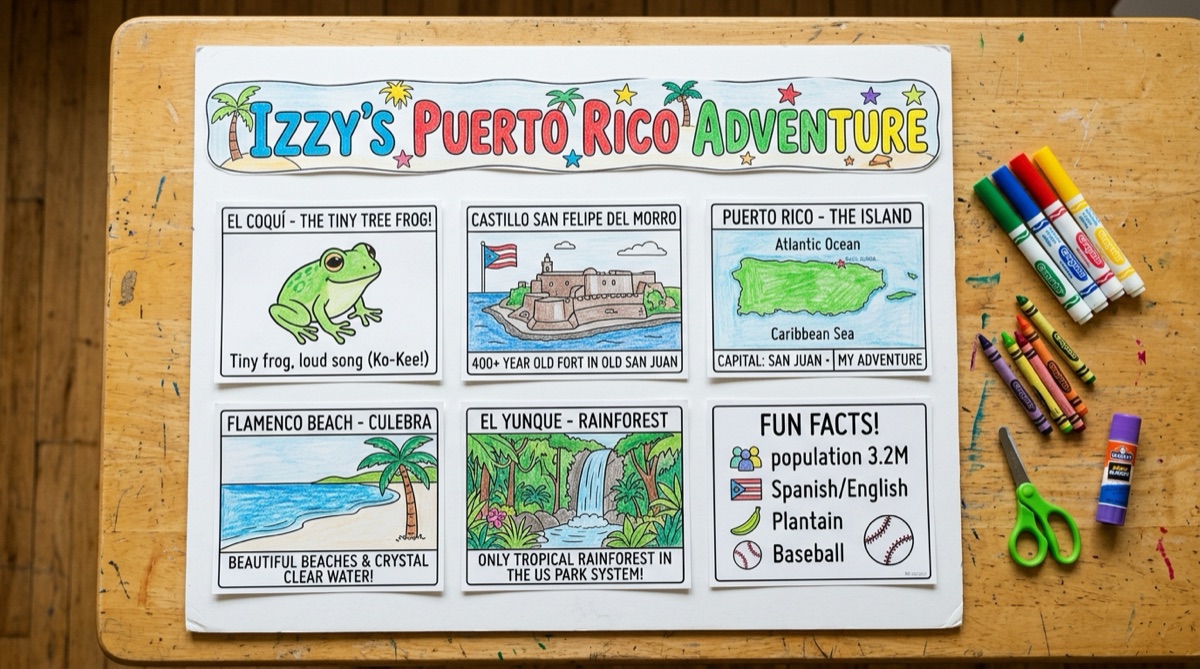
- User Scenario: A parent sits down with their kindergartner on a weekend afternoon. They open the web studio, let the child answer fun discovery questions, choose their favorite music hero and 3 wild trivia facts, and hit print. 6 perfectly calibrated sheets emerge from their home printer—including a giant rotated banner with hollow bubble letters and pocket speech cue cards ready for crayons and scissors.
CUJ 2: Interactive Discovery & Country Exploration (Student)
- Statement: I want to discover which country matches my curiosity through a 4-question explorer quiz while avoiding dry, dense encyclopedic reading so that I feel like a real explorer and can proudly teach my classmates about my chosen culture.
- User Scenario: A student who hasn't chosen a country yet takes the interactive visual quiz on an iPad, finds their match with celebratory sound effects and confetti, hears the traditional cheer ("¡Wepa!"), and listens to the browser voice coach practice their 1-minute class speech with them.
🗺️ The Ideal Flows
Flow 1: End-to-End Poster Creation & Speech Coaching
- Trigger: Student receives a cultural heritage display assignment with a 28″ × 22″ poster rubric.
- Action: The parent/student visits the web app, types their name ("Izzy"), and selects their country (or takes the 4-question discovery quiz).
- Automated Response:
- The engine instantly customizes the 9-category curriculum across 12 countries.
- Generates high-contrast, pure black-and-white line-art illustrations (4:3 landscape, 5.2″ × 4.0″) paired with concise, kindergarten-accessible fact columns (2.1″).
- Generates a giant header banner natively rotated 90° to span 9.8″ × 4.8″ along the 11″ paper length with 84px and 56px hollow bubble letters.
- Compiles a 1-minute presentation script and provides browser-native text-to-speech practice.
- Resolution: The child colors all illustrations with markers/crayons, cuts along dashed outer guide lines, pastes them into the 3×3 grid on the board, and uses their pocket cue cards to give an A+ speech in class.
🛠️ The Solution Architecture
flowchart TD
    A["Parent & Child / Input"] --> B["Kid Explorer Quiz & Profile Studio"]
    B --> C["Country Knowledge Base (12 Countries)"]
    C --> D["Reactive DOM Coordinator"]
    D --> E["28″ × 22″ Real-Time Board Mockup"]
    D --> F["6 Precision 8.5″ × 11″ Print Sheets"]
    F --> F1["Sheet 1: Giant 9.8″ × 4.8″ Rotated Banner (Bubble Letters)"]
    F --> F2["Sheets 2-5: Category Cards 1-8 (5.2″ × 4.0″ Line Art)"]
    F --> F3["Sheet 6: Card 9 (3 Chosen Facts) + Cutout Speech Cue Cards"]
    D --> G["Web Speech Synthesis (1-Min Audio Coach)"]
💻 Technical Logic & Implementation Details
1. Vector Banner Rotation Algorithm
- Approach: Render the banner using an SVG viewBox (
0 0 480 980) withrotate(90) translate(0, -480). This bypasses CSS page orientation bugs across browser print dialogs, guaranteeing the banner prints along the 11″ dimension of the paper to yield a 9.8″ × 4.8″ banner with 84px bubble letters (-webkit-text-stroke: 5px black; fill: white;). - Key Achievements:
- Prints vertically along the 11″ page length on Sheet 1 without clipping.
- Text fills cleanly when colored with physical markers and crayons.
- Zero teacher notes or parent instructions inside the dashed cutting rectangle.
2. Ink-Conserving 100% Black-and-White Art System
- Approach: Every asset is pure 1-bit vector line art or thresholded edge-detected illustration on a pure white background (
#ffffff). No gray wash, no gradients, and zero color ink required. - Key Achievements:
- Zero pre-shaded gray fills inside coloring regions, preserving maximum physical creative expression.
- Image boxes sized strictly to 5.2″ W × 4.0″ H to maintain 4:3 visual symmetry across the 28″ × 22″ board.
3. Web Speech Synthesis & Pocket Cue Cards
- Approach: Format child selections into a 6-sentence kindergarten speech script with phonetic pronunciation guides and trigger
window.speechSynthesiswithrate: 0.9andpitch: 1.05. - Key Achievements:
- Audio playback functions natively in modern desktop and mobile browsers.
- Speech cue cards auto-update and print onto the lower half of Sheet 6 for presentation day confidence.