
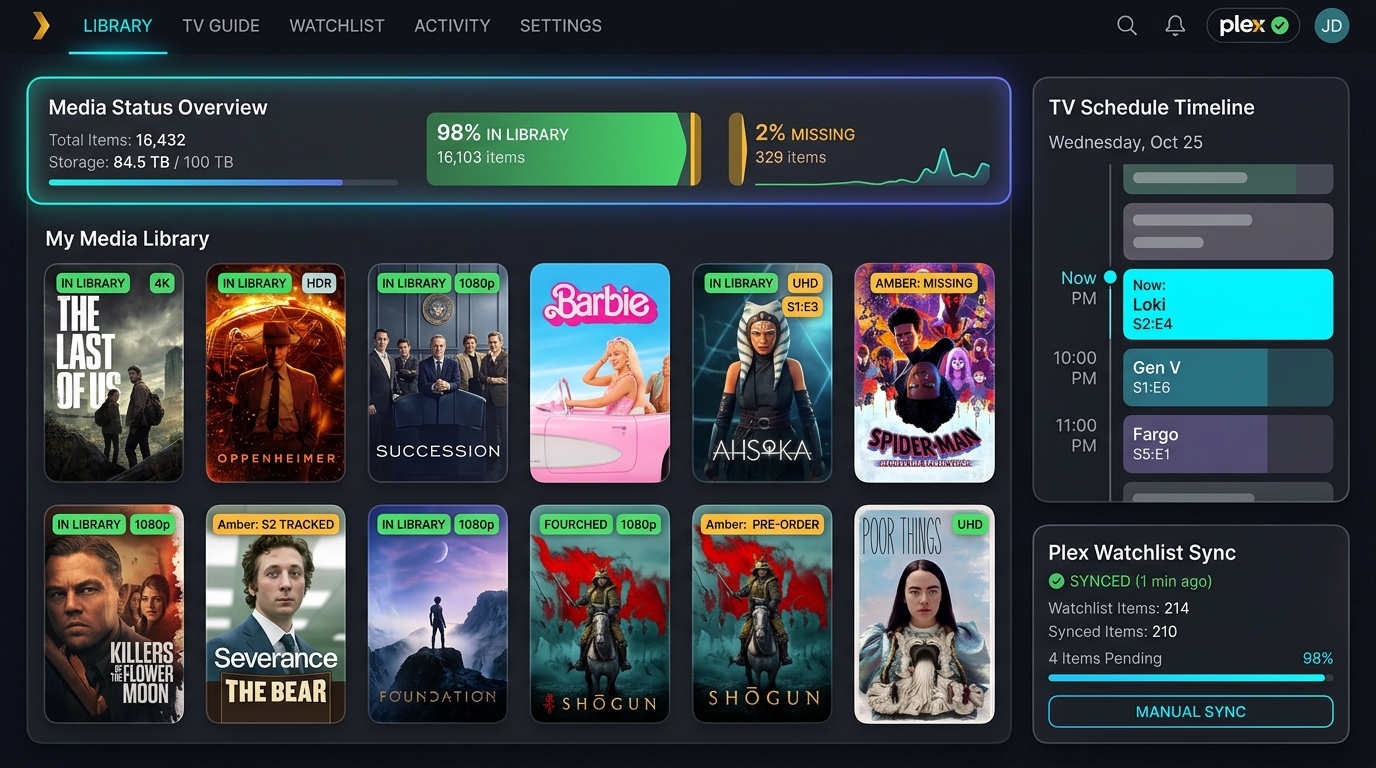
An automation tool and dashboard designed to bridge the gap between my global Plex Watchlist, local server libraries, and real-time TV guide schedules.
The Problem Space
Context
Plex has a fantastic Watchlist feature. Whenever I'm having a conversation with friends, reading a review, or hearing a recommendation, my immediate reflex is to say, "Let me add it to my watchlist." It is a friction-free, single-tap repository for future entertainment.
The Core Friction
However, the Plex Watchlist operates as a black box. It knows what I want to watch, but it has no integration with my local media server to show what I can watch.
Once a title is added, there is no visual indicator to show whether it is:
- Already downloaded and available on my local server.
- Fully or partially missing from my server.
- Airing in the future or currently between seasons.
To figure out if a watchlist item was playable, I had to manually search my server or click into every single detail card. This manual checking loop created high cognitive load and friction, turning my curation watchlist into a graveyard of unorganized titles.
Critical User Journeys (CUJs)
CUJ 1: Watchlist Availability & Media Discovery Gaps
- Statement: I want to instantly see which watchlist items are missing from my server while avoiding manually clicking through and checking every card on my server so that I can quickly decide what I need to download, purchase, or subscribe to.
- User Scenario: It's a Friday night, and I'm sitting on the couch. I have 15 minutes to pick a movie. I want to scroll through my watchlist and only see the titles that are ready to play right now, or look at a dedicated list of missing files so I can trigger downloads for the weekend.
CUJ 2: The New Season Hype & Rewatch Trigger
- Statement: I want to track upcoming release dates for shows I am caught up on while avoiding manually monitoring release schedules or missing premiere dates so that I can queue up new episodes or trigger a rewatch of previous seasons to refresh my memory.
- User Scenario: I finished Season 2 of a show six months ago, and it disappeared from my active queue. A new season is airing next month. I want the show to automatically pop back onto my dashboard with a countdown to the premiere so I can plan to download it or start a rewatch of Season 2.
The Ideal Flows
Flow 1: Watchlist Availability Gaps
- Trigger: I hear about a movie at lunch and add it to my Plex Watchlist on my phone.
- Action: The custom Plex Media Hub periodically syncs with the Plex API.
- Automated Response: The backend parses my local server libraries, compares them against my watchlist, and identifies that the movie is missing.
- Resolution: The movie appears in the Watchlist Gaps tab on the dashboard, complete with direct links to download or purchase it.
Flow 2: Upcoming New Season Alerts
- Trigger: I watch the finale of Season 2 of a show on my local server.
- Action: The dashboard removes the show from my active "Continue Watching" queue because I'm caught up.
- Automated Response: The backend runs scheduled TV guide checks and detects that Season 3 of the show is premiering in 14 days.
- Resolution: The show automatically reappears on the dashboard in a dedicated Upcoming New Seasons section, displaying the premiere countdown.
The Solution: Plex Media Hub
To solve these journeys, I built a lightweight, containerized dashboard consisting of a Python (FastAPI) backend and a Modern HTML5/JS frontend running locally at http://localhost:8085.
graph TD
    A[Plex Watchlist API] -->|Syncs| B(FastAPI Backend)
    C[Local Plex Media Server] -->|Indexes Libraries| B
    D[TVmaze API] -->|Fetch Schedules| B
    B -->|Generates Dashboard Data| E[HTML/JS Frontend]
    E -->|Renders Tabbed UI| F[Plex Media Hub Dashboard]
Key UI Features
- Watchlist Gaps: Displays everything in the watchlist that is missing from the local server.
- Continue Watching Partition: Dynamically splits active progress ("Currently Watching") from future releases ("Upcoming New Seasons").
- Unwatched Library: Shows media in the local library that has not been watched and is not in the watchlist, exposing hidden library gems.
- Saga Browser: Tracks progress through long-running movie franchises (e.g. Rocky, Fast & Furious).
Under the Hood (Code & Architecture)
1. Library Indexing & GUID Matching
To resolve the watchlist "black box," the system translates global Plex metadata identifiers into local files.
- Approach: We query local server libraries, match item GUIDs, and cache metadata to keep indexing times sub-second.
- Key Code Logic:
- Iterates through Plex libraries, collects GUIDs (including IMDb/TVDB cross-references), and caches the index.
- Optimization: Skips fetching full episode trees (
item.episodes()) for unwatched/completed shows, preventing local API timeouts.
2. Status Scheduling & Out-of-Order History
Calculating upcoming season releases requires matching watch counts with scheduled airings.
- Approach: Integrates local watch history with TVmaze API data, applying a custom search fallback for title mismatches.
- Key Code Logic:
- Out-of-Order Parsing: Evaluates the individual
watchedflag on each episode rather than a simple watch count. This resolves complex user patterns (e.g., if you watched Season 9 live but still have Season 8 episodes left, it directs you back to finish Season 8). - Identifies TV status codes:
available(downloaded and ready),missing(aired but missing),mid_season_upcoming, andnew_season_upcoming(upcoming seasons).
- Out-of-Order Parsing: Evaluates the individual
3. Frontend Partitioning
- Approach: Dynamically renders distinct visual sub-grids depending on show status metadata.
- Key Code Logic:
- Separates active TV shows from upcoming premieres on the fly using the
new_season_upcomingstatus tag. - Uses a cache-busted asset delivery (
?v=2) to ensure browser rendering code updates immediately upon release.
- Separates active TV shows from upcoming premieres on the fly using the
Repository & Source Code
Explore the full open-source codebase, installation instructions, and schema definitions on GitHub: